Introduction
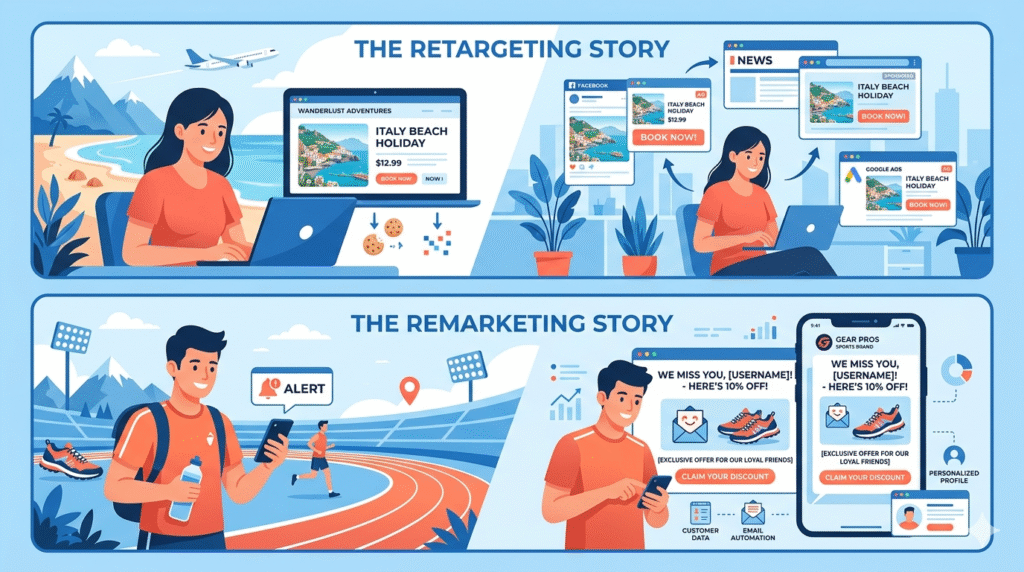
In the world of digital marketing, two terms often get used interchangeably — remarketing vs retargeting. But while they share a common goal of reconnecting with potential customers, they are not the same thing. Understanding the difference between remarketing and retargeting can make a significant impact on how effectively you spend your advertising budget and re-engage your audience.
Whether you’re running campaigns on Google Ads, Facebook Ads, or through email marketing tools, knowing which strategy to use — and when — is essential. This article breaks down the definitions, differences, and practical applications of both so that you can make smarter, more informed decisions for your business.
What Is Remarketing vs Retargeting? (Clear Definitions)
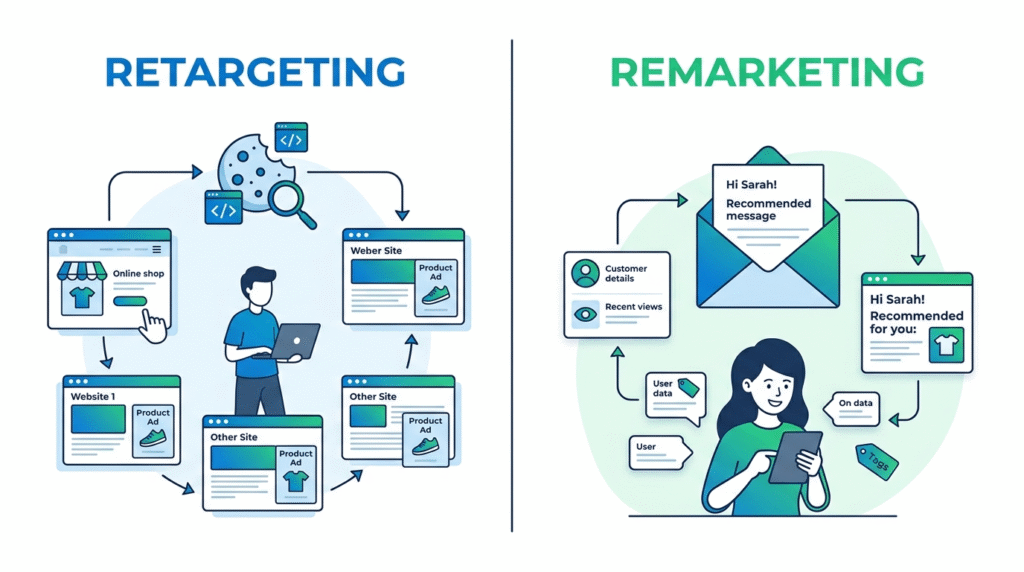
Before diving into the differences, let’s define each term clearly.
Retargeting is the practice of targeting users who have previously visited your website or app but did not complete a desired action — such as making a purchase. It uses cookies or tracking pixels to follow these users across the web and display ads that encourage them to return to your site.
Remarketing, on the other hand, is a strategy focused on reconnecting with users who have already interacted with your brand. It typically works through email marketing or display ads and is more focused on re-engaging existing customers who have already shown interest in your products or services.
In short: retargeting is primarily ad-based, while remarketing leans heavily on email.
How Does Retargeting Work?
The Role of Cookies and Pixels
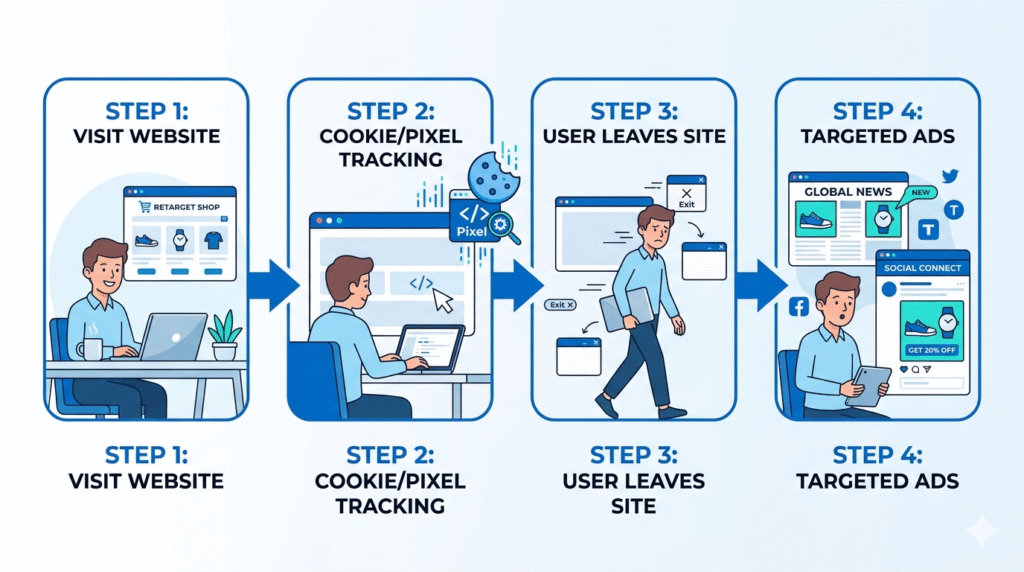
Retargeting works by placing a small piece of code — known as a cookie or tracking pixel — on your website. When a user visits your site and leaves without converting, this pixel records their visit. That data is then used to display targeted ads to the user as they browse other websites or scroll through social media platforms.
For example, imagine a user visits an online shoe store, looks at a pair of trainers, but doesn’t buy them. With retargeting in place, that user will start seeing ads for those exact trainers on other websites they visit, on Facebook, or on Google’s display network. The goal is simple: bring them back.
Platforms Used in Retargeting
Retargeting campaigns typically run through third-party advertising platforms such as:
- Google Ads — displaying banner and display ads across millions of websites in the Google Display Network
- Facebook Ads — serving ads to users on Facebook and Instagram based on their previous site interactions
These platforms give marketers the ability to reach a highly specific audience — people who have already shown interest — without relying on any existing customer relationship.
How Does Remarketing Work?
Re-Engaging Through Email
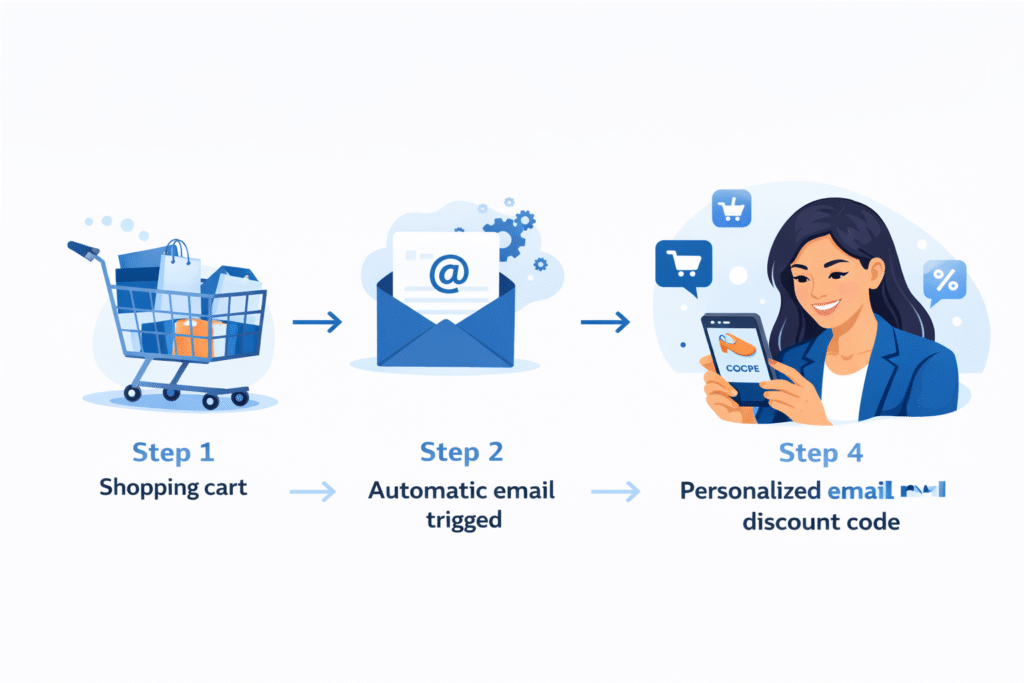
Remarketing focuses on re-engaging users through email marketing. Unlike retargeting, which relies on third-party ad platforms and cookies, remarketing uses your own customer data — typically stored in a CRM (Customer Relationship Management) system or email marketing platform.
A classic example of remarketing in action is the abandoned cart email. If a customer adds items to their online shopping cart but leaves before checking out, a remarketing campaign would automatically trigger a personalised email encouraging them to complete their purchase.
Tools Used in Remarketing
Remarketing relies on first-party data and tools that you already own or manage, including:
- CRM systems — to manage and segment existing customer data
- Email marketing platforms — to send targeted, personalised communications directly to users’ inboxes
Because remarketing uses data from your own customer base, it tends to feel more personal and relationship-focused than retargeting.
Key Differences Between Remarketing and Retargeting
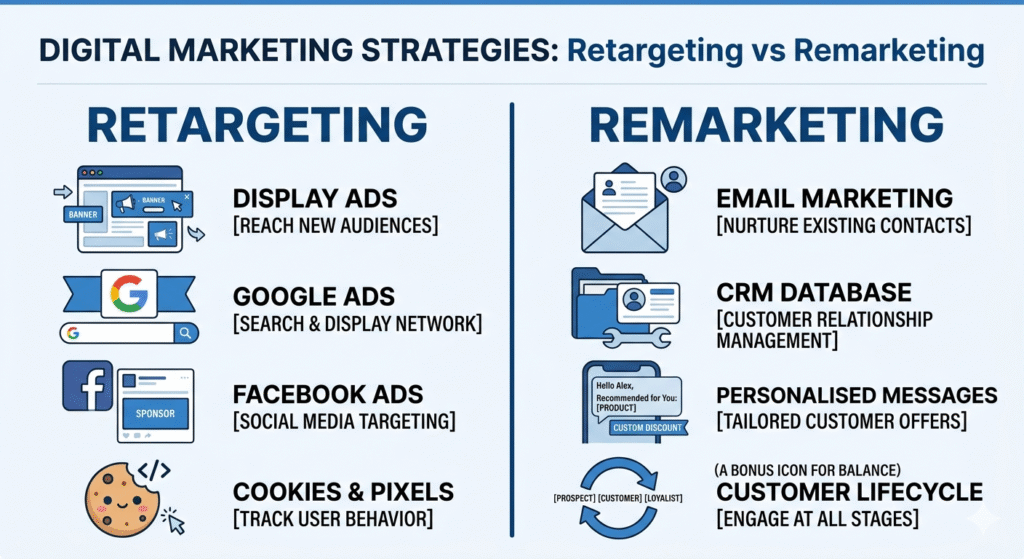
Understanding the core differences helps marketers choose the right tool for each situation.
| Feature | Retargeting | Remarketing |
|---|---|---|
| Primary Channel | Display ads (web and social media) | Email marketing |
| Data Source | Third-party platforms (cookies/pixels) | First-party data (CRM/email tools) |
| Platforms Used | Google Ads, Facebook Ads | Email marketing and CRM systems |
| Target Audience | Website visitors who didn’t convert | Existing customers or leads who showed interest |
| Goal | Drive users back to complete an action | Re-engage and nurture existing relationships |
Why Does the Difference Between Remarketing and Retargeting Matter?
Choosing the Right Strategy for Your Goals
Knowing the difference between remarketing and retargeting in digital marketing isn’t just academic — it directly affects your campaign results. Here’s why it matters:
- If your goal is to recapture anonymous website visitors who left without converting, retargeting is the right tool. You don’t need their email address; you just need a pixel on your site.
- If your goal is to re-engage customers you already have a relationship with, remarketing through email is far more effective and personal.
Using the wrong strategy for the wrong audience can result in wasted ad spend, poor engagement rates, and missed opportunities to convert warm leads into paying customers.
Remarketing vs Retargeting on Facebook
On platforms like Facebook, the lines can appear blurry. Facebook Ads supports both approaches — you can retarget users who visited your website using the Facebook Pixel, or you can upload a customer email list to create a custom audience for remarketing purposes. Understanding which approach you’re using helps you craft the right creative, copy, and call to action for each campaign.
Practical Examples: Remarketing vs Retargeting in Action
Retargeting Example
A user visits a travel booking website, browses holiday packages to Bali, but leaves the page without booking. Over the next few days, they see display ads for those Bali packages on various websites they visit and on their Facebook feed. This is retargeting — using ad platforms and tracking pixels to follow the user and bring them back.
Remarketing Example
A returning customer who previously bought running shoes from a sports retailer receives a personalised email three weeks later featuring a new range of running gear with a discount code. This is remarketing — using existing customer data to send a highly relevant email and encourage a repeat purchase.
Which Strategy Should You Use?
The honest answer is: both, used strategically.
- Use retargeting to recapture visitors who haven’t yet converted — people who showed interest by visiting your site but left before taking action.
- Use remarketing to deepen relationships with existing customers and encourage repeat purchases or further engagement via email.
When used together, retargeting and remarketing create a powerful, multi-channel re-engagement strategy that covers both new and existing audiences.
Conclusion
When it comes to remarketing vs retargeting, the distinction is clear once you understand the channels and data each strategy relies on. Retargeting chases anonymous site visitors with display ads across the web using cookies and pixels through platforms like Google Ads and Facebook Ads. Remarketing, by contrast, re-engages known customers through email using your own CRM and customer data.
Both are valuable tools in a digital marketer’s arsenal. The key is knowing which one to deploy based on your audience, your goal, and the relationship you already have with that user. Used correctly, these strategies can significantly improve conversion rates and help you get more value from every person who interacts with your brand.
Key Takeaways
- Retargeting uses cookies and pixels to show display ads to users who visited your website but didn’t convert — typically through platforms like Google Ads or Facebook Ads.
- Remarketing re-engages existing customers or leads using email marketing and first-party data stored in CRM systems.
- The primary channel for retargeting is paid display advertising; for remarketing, it is email.
- Retargeting targets anonymous visitors; remarketing targets people you already have a relationship with.
- On platforms like Facebook, both approaches are possible — understanding which you’re using helps you tailor your creative and messaging effectively.
- Using both strategies together creates a comprehensive re-engagement system that covers new and returning audiences across multiple channels.
About the Author
Written by Gourav Meet
Gourav Meet is a digital marketing strategist and SEO content expert with a passion for breaking down complex marketing concepts into clear, actionable insights. From paid advertising and email marketing to search engine optimisation and content strategy, Gourav helps businesses understand and apply the strategies that drive real results.
Want to learn more about digital marketing, SEO, and smarter campaign strategies? Visit gouravmeet.com for more expert guides, tips, and resources to help grow your online presence.
Have a question or topic you’d like covered? Reach out directly through gouravmeet.com.